Download Smart Call Accept 1 12 apk
Friday, January 24, 2014
 Smart Call Accept 1.12 apk
Just wave your hand above phones proximity sensor or hold the device near your ear to accept, reject incoming calls or activate silent mode.
This app can work like Air Call-Accept feature on Galaxy S4.
You can also talk to your phone "Hello" to accept, "Stop" for reject and "Silent" for silent mode
If you have any problem, instead off give ONE star rating, please email me you phone name and OS version, we will try to fix it.
Feature:
- Accept incoming call
- Reject incoming call
- Activate silent mode
- Option to enable external speaker
- App still work normally when your phone in the pocket or upside down
- Talk with phone to activate command
Turn off or even uninstall all similar app for accurate result. This app only work if your phone has proximity sensor. Wave your hand at normal speed above your phones proximity sensor to activate command
Usage:
- You must press Turn On before use
- Wave your hand 2 times if your phone is not in the pocket before.
- If your phone is not in the pocket, you can hold it near your ear and shake 2 times
- When your phone is in the pocket and ringing, you wave your hand 1 time or hold it near your ear.
us
- You must enable Voice control in Setting for voice command
- Voice control support offline on Jerry Bean 4.1+ and the rest must online
- When enable Voice control your phone auto switch to Vibrate mode
Future version:
- Auto turn off external speaker when you hold the phone near your ear
- Auto turn on external speaker when your phone not near your ear
- Can can add your own voice command and word, support more language
*During the time you use our app, we collect anonymous data and error reports in order to improve application (Google Analytics).
*About Permissions
PHONE CALLS: for accept or reject phone call.
AUDIO SETTINGS: for turn on or off external speaker
NETWORK COMMUNICATION: for small ad banner in setting
Keywords: call accept, call answer, proximity sensor


Smart Remote for Galaxy S4 Apk 1 2 2
Saturday, December 7, 2013

Description about Smart Remote for Galaxy S4 Apk (1.2.2)
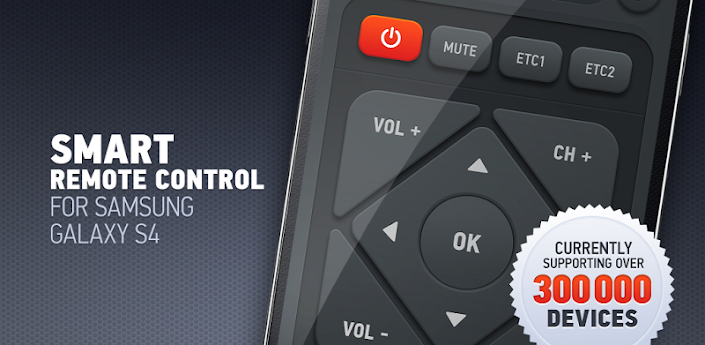
You can now use your phone as an Infrared Remote (IR Remote)Why should you need to use more than one remote for all the devices you own ?
With Smart Remote for your Samsung Galaxy S4, you can add, create and customize any number of remotes, combining controls from any of your existing remotes. Imagine a single remote on which the CHANNEL UP button controls your Set Top Box from your TV provider, the VOLUME keys control your home theater system and the arrow keys control your TVs menu.
On top of all that, since youre holding a phone, why not use some of its unique features?
AIR GESTURES - exclusive to your phone!
Simply leave the app open, and wave your hand above your phone to change channels (left to right) or volume (up and down)
AUTOMATIC MUTE WHEN YOU GET CALLED
Dont you hate it when you receive a call but cant hear the other person because the TV is too loud? Now, Smart Remote can automatically mute your current device when someone calls you.
DYNAMIC VOLUME - BETA
Smart Remote will automatically turn down your volume when there are sudden high-volume sounds (think movie explosions), or it will turn up your volume when the sounds are too low to hear (think actors voices not being loud enough)
With infrared - IR Blaster - already included in your phone, why shouldnt you make the most of it? Smart Remote can control your TV, Set Top Box, Lights, Projectors, etc.. Virtually anything that has an Infrared Receiver can be controlled by Smart Remote with the correct remote codes. And were working 24/7 on adding more!
Why not get rid of your TV remote, set top box remote, and home center remote, all at once ?
Screenshot Of Smart Remote for Galaxy S4 Apk (1.2.2)
 |
Download Smart Remote for Galaxy S4 Apk (1.2.2) Here
Smart Taskbar 2 V2 PRO 2 2 1 APK
Wednesday, November 27, 2013
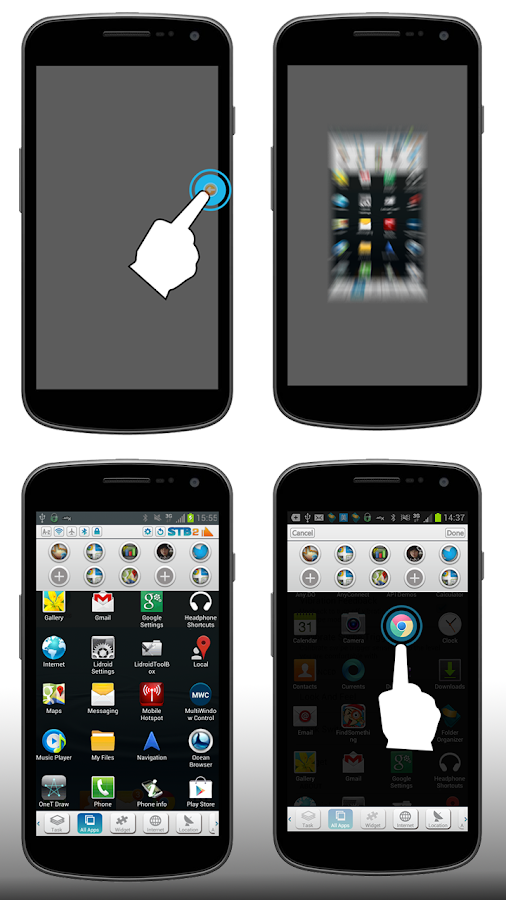
Launch any application instantly without leaving your current window. Swipe your finger or click the trigger icon anytime in any App to bring up Smart Taskbar panel for super fast app launching also works as app organizer, folder organizer, multi tasker, task killer, and shortcut manager.
It does more than launching Apps. You can also build custom action (AKA shortcut) to complete one click speedy dial or one click navigation on the actions you built in Smart Taskbar. Its more than that! You can even add desktop widget in Smart Taskbar so there there is no more desktop space limitation anymore! f000h
Smart Taskbar V2 is completely rewritten with brand new UI and is developed with gesture driven in mind. You can now complete many tedious App organization jobs with drag and drop. The trigger icon is also now free floatabe and auto dim itself after customizable idle timeout.
If you want to use your phone one handed with complete touch experience, you find Android system takes too many steps to complete one simple job, or you need a faster way to get things organized, get Smart Taskbar to make your life easier.
Smart Taskbar 2 (V2) PRO 2.2.1 APK is the first and origin of all similar app in this class. It is the most customizable and more complete in features. In addition, compare to others, Smart Taskbar requires way less steps, finger touch, to do what you want to do.
Language available in: English, Chinese
Smart Taskbar 2 (V2) PRO 2.2.1 APK Whats new in V2 ☆☆☆☆
(1) Free floatable trigger icon
(2) Item organization now supports on screen drag and drop in edit mode
(3) Groups Apps, Custom Actions together to form folder
(4) 10 Quick Launch spots available
(5) All graphics in HD quality including trigger icons
(6) More HD quality trigger icons styles to choose from (More coming)
(7) Sortable item list with different filters
(8) Label reordering now supports drag and drop
(9) UI optimized for Tablet
Smart Taskbar 2 (V2) PRO 2.2.1 APK Features ☆☆☆☆
*Build custom action (Need Pro if more than 5)
Smart Taskbar doesnt just launch your installed APP, but also builds any combination of action such as direct phone call to someone or go to your bookmark for super fast without leaving your current window.
Smart Taskbar 2 (V2) PRO 2.2.1 APK Super fast launcher
Smart Taskbar is exceptionally designed to use your phones CPU efficiently. The result is a super smooth and fast switching experience.
Smart Taskbar 2 (V2) PRO 2.2.1 APK 10 quick launch spots
Store your favorite apps or shortcut in any of the five spots for 2 steps instant access.
Smart Taskbar 2 (V2) PRO 2.2.1 APK Multi Tasker (multitasking)
Navigate to TASK label to see recent/running app in no time.
Smart Taskbar 2 (V2) PRO 2.2.1 APK Task killer (need pro)
Smart Taskbar also does task killer function to a more direct and intuitive level. Just click on any of the running app and it will be stopped instantly.
Smart Taskbar 2 (V2) PRO 2.2.1 APK App organizer
Your phone is packed with hundred of APPS? Use Smart Taskbar to create label to group them by function/usage/location.. whatever you like.
Smart Taskbar 2 (V2) PRO 2.2.1 APK Widget
Smart Taskbar takes widget support differently. Instead of showing your widget to Home screen, you use widget in Smart Taskbar just like launching a regular App. It is very convenient if you have too many widgets to show or you want higer security by not letting people easily see your social widgets at Home screen.
Smart Taskbar 2 (V2) PRO 2.2.1 APK Quick uninstaller
Quickly uninstall any installed app with just one finger click. No more walk through native Android settign trees for just a simple app uninstall action.
Smart Taskbar 2 (V2) PRO 2.2.1 APK Quick App setting management
One click to go to App info page for, super fast clear cache, clear data, force stop, and uninstall.
Smart Taskbar 2 (V2) PRO 2.2.1 APK Recent changes:
(1) Fixed Crash when making backup on device running 2.3 or older
(2) Added rectangular shape quick launch spot option in look and feel
Visit Website
Less description »
Smart Taskbar 2 (V2) PRO 2.2.1 APK Note:
all premium features available. no key file needed.
Smart Taskbar 2 (V2) PRO 2.2.1 APK
Requirements: Android v2.2+
Overview: All new Smart Taskbar V2. The same Smart Taskbar with new look and more power functions and this time it is one app that runs on both phone and tablet devices.
Smart Taskbar 2 (V2) PRO 2.2.1 APK
MORE INFO:
https://play.google.com/store/apps/details?id=com.kiumiu.ca.taskbar2
Download Smart Cover Lite Screen Off 1 25 apk
Sunday, November 24, 2013
 Smart Cover Lite(Screen Off) 1.25 apk
<<<<<<<<< News >>>>>>>>>
After the update, if the device dont work well , delete the app then please reset!!
The used step may not be appropriate. Then please select other step.
[App Contents]
1. This app using the proximity sensor can automatically control the Screen On / Off.
2. Flip cover users is highly recommended.
3. After testing about 10 times on each step, find the step that dont have automatic blinkling options, and then set appropriate step.
[ Main Functions ]
1. When you open or close the cover, the screen turns on and off automatically.
2. Landscape Mode
- When Landscape Mode is running,Sensor pause (Only Pro Version)
3. Special App
- It is to be used in app like camera, game.
- When it is running, Sensor pause.
4. Notification in the status bar.
5. Service execute automatically when the phone restart.
6. Vibration when the screen is closed.
7. Sound when the screen is closed.
8. Widget add (1 x 2, 1 x 1)
- Power Button
- Service On/Off Button (Only Pro Version)
- App Link Button
[ Notices ]
1. To delete This app, Service-Execute button must be OFF.
[Tag]
Security / off / on / lock / password / proximity / System off n lock / flip cover
[History]
Ver 1.21
. Vibration intensity control function add
. Power-Saving (Sleep~awake time) (Pro version)
. The step of 8 add
Ver 1.20
. One sound add
. Changed to a service that does not die (except Task Manager)
. Receiving a call with shake add (Pro version)
Ver 1.19
. Vibration ,sound and other additional patches
Ver 1.18
.Android 4.0.4 patch
Ver 1.17
. Auto-Screen Off - toggle button add
Ver 1.14 ~ 15 ~ 16
.Android 4.0.4 patch
Ver 1.13
. Added the option to select the sound
. No-action generated vibration, sound bugs were fixed.
Ver 1.11~12
. Memory Cleaner
-Memory Auto Clean when screen off
Ver 1.10
. Nexus 4(Model:LG-E960) patch
Ver 1.09
. Sensor pause during phone call
Ver 1.08
. Landscape mode Add (Only Pro Version)
. Widget error Update
Ver 1.07
. Android 4.0.4 Bug Patch
Ver 1.06
. Widget Add (1 x 2, 1 x 1)
- Power Button
- Service On/Off Button (Only Pro Version)
- App Link Button
Ver 1.05
- When screen is turned off Sound add
Ver 1.04
- Pause proximity sensor during phone calls
- Special App add(limit 2 app)
Ver 1.03
- When screen is turned off Vibration add
Ver 1.02
- Screen Auto-On (On) toggle option add


Smart Tools v1 6 Apk
Thursday, November 21, 2013
Smart Tools v1.6

Set 1: Length, Angle, Slope, Level, Thread - Smart Ruler Pro
Set 2: Distance, Height, Width, Area - Smart Measure Pro
Set 3: Compass, Metal detector, GPS - Smart Compass Pro
Set 4: Sound level meter, Vibrometer - Sound Meter Pro
Set 5: Flashlight, Magnifier, Mirror - Smart Light Pro
Even more tools will be added soon. Next will be Barometer and more.
Do you want to get more tools and features? Please send an email. Ill reply to it ASAP.
I hope my apps are useful to your SMART Life.
* A magnetic sensor is required. So this app cannot support several android devices (e.g HTC Desire X).
** Off-line support (for Wi-Fi only devices) : Open this several times with connections, you can open it without connection.
*** This app had been published only on Google Play and Androidpit (not Amazon app store).
Screenshots :


