Showing posts with label advanced. Show all posts
Showing posts with label advanced. Show all posts
Advanced Download Manager Pro 3 0 4 APK
Thursday, May 1, 2014
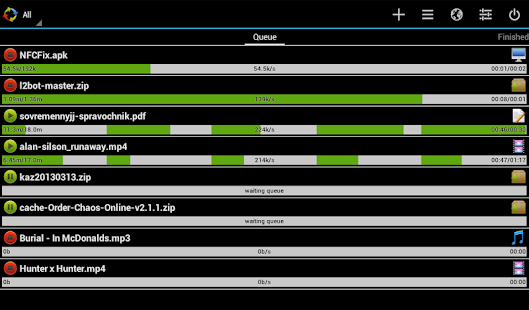
- download up to three files simultaneously;
- accelerated download by using multithreading (9 parts)
- interception of links from the browser and clipboard;
- icon of the program and downloading progress in the notification panel;
- backup list of downloads and settings on SD card;
- completion notification by sound and vibration;
- resume after reconnection or program restart;
- save different file types in different folders;
- built-in browser for sites with registration;
- plan files download on a schedule;
- widget on your home screen;
- site manager;
- NO ADS
Add links from browser:
- press on link and from the window "Complete action using" select ADM (supported by Stock Browser, Dolphin, Boat Browser, Chrome)
- long press on a link to display the context menu, press "Share link" and from the window "Share via" select ADM (supported by Firefox, Skyfire, Stock Browser, Dolphin, Boat Browser)
- copy the link and the service will intercept the link (supported by Maxthon)
Controls:
- press on the download to start/stop the process;
- press on the completed download to open the file;
- long press on download to display the context menu.
NOTE: YouTube is not supported under the rules of Google.
Whats New in Advanced Download Manager Pro 3.0.4 APK
Updated interface.
Want to translate the program into your language? Email us!
Advanced Download Manager Pro 3.0.4 APK
Requirements: Varies with device
Overview: parallel downloading three files simultaneously
Advanced Download Manager Pro 3.0.4 APK
MORE INFO:
https://play.google.com/store/apps/details?id=com.dv.adm.pro

Advanced Task Manager Pro v3 1 9 APK download
Friday, November 22, 2013
Advanced Task Manager Pro v3.1.9 APK download 
Best task killer for android system, speed up phone, save battery!
Kill tasks,free memory,speed up phone,save battery.
ATM 2.0 with totally new UI is comming, and its really cool!!!
Features:
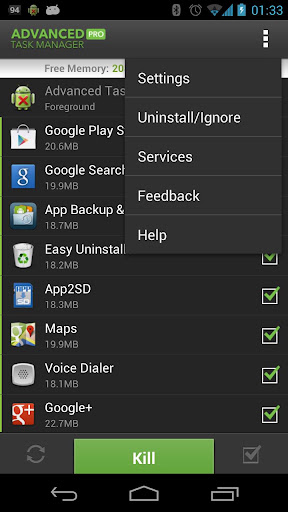
Advanced Task Manager (ATMGR or ATM) is basicly a task killer. It can list all the running tasks, and you can select some of them to kill. It is also a task manager tool to manage all the apps or running apps, you can long click on the task that you want to kill, and you will get a poped up menu with more options.
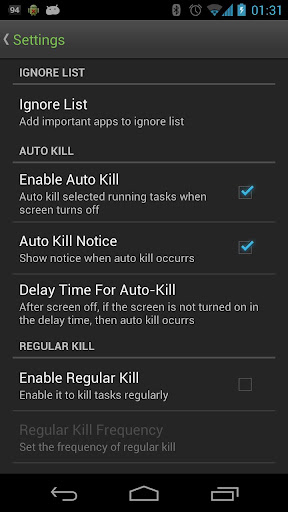
You may found that some apps are restarted again and again after killing, for some tasks are restarted by system events automatically. And we suggest that you enable Auto Kill in settings. Then it will kill tasks on every screen off. It will help to save battery and extend the battery life by terminating some apps that drawns too much battery.
There are many task killer apps in the google market. What is the difference between our app with other task killers? Basically our app killer list more apps then others, because the way we use to get system running task list is same as the android system panel. Another important difference is that we have an uninstaller feature in our task killer, and you can uninstall useless apps. Most of the task killers have one click widget, but our widget can show available memory. Its not default enabled, users should enable it in settings. Overall our app killer is the best one of so many task or app kill tools in the market.
Whats in this version : (Updated : Sep 25, 2013)
Kill tasks,free memory,speed up phone,save battery.
ATM 2.0 with totally new UI is comming, and its really cool!!!
Features:
- Task killer, kill selected tasks
- Ignore apps when kill tasks
- Auto kill tasks on every screen off
- Regular kill
- Startup Kill
- One click task kill widget
- Quick uninstaller
- Show battery life
- Support android 1.5/1.6/2.2/2.3/3.x/4.0
- Ad Free
Advanced Task Manager (ATMGR or ATM) is basicly a task killer. It can list all the running tasks, and you can select some of them to kill. It is also a task manager tool to manage all the apps or running apps, you can long click on the task that you want to kill, and you will get a poped up menu with more options.
You may found that some apps are restarted again and again after killing, for some tasks are restarted by system events automatically. And we suggest that you enable Auto Kill in settings. Then it will kill tasks on every screen off. It will help to save battery and extend the battery life by terminating some apps that drawns too much battery.
There are many task killer apps in the google market. What is the difference between our app with other task killers? Basically our app killer list more apps then others, because the way we use to get system running task list is same as the android system panel. Another important difference is that we have an uninstaller feature in our task killer, and you can uninstall useless apps. Most of the task killers have one click widget, but our widget can show available memory. Its not default enabled, users should enable it in settings. Overall our app killer is the best one of so many task or app kill tools in the market.
Whats in this version : (Updated : Sep 25, 2013)
- Multi-window support
Screenshots :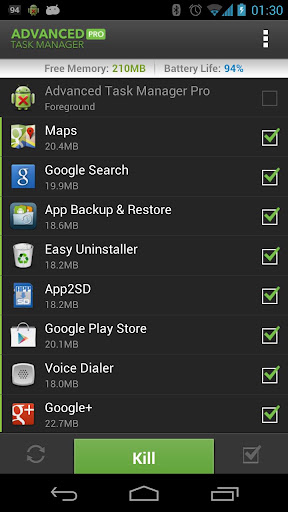
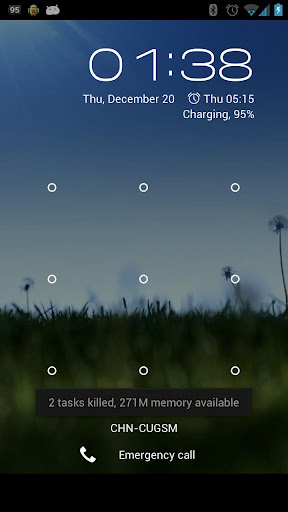
Required Android : 1.6+
Download 1.5mb apk via
Subscribe to:
Posts (Atom)

